


226 158 158
Upcoming arrivals, lines and buses in real timeHow it works
At the bus stop
Send the stop code
Each stop has its own IDSTOP code indicated on the sign, for example FCUP1 at the Faculty of Sciences. Sending it is all you need to do.
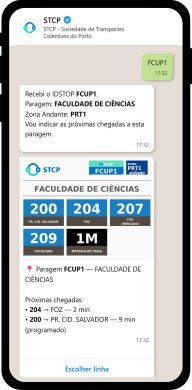
Send the code. You will receive the name and Andante zone of the stop, available lines and upcoming arrivals.

Select Choose line. The sign opens in the browser and you can choose the line number to see the information in real time.
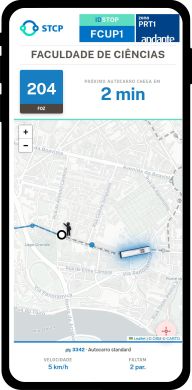
Follow the route. See the bus's location, arrival time, and how many stops are left until your destination on the map.
Choose the line
Or start with the line number
You can send the line number, for example, 204. WhatsApp will open the route map so you can easily find your stop.
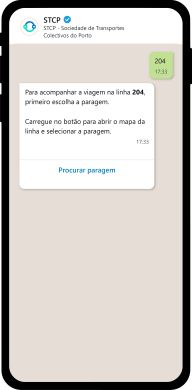
Send the line number and select Search for stop .
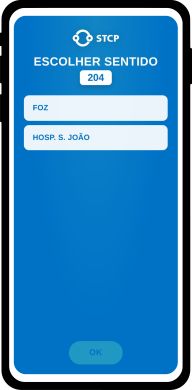
Choose the direction in which you will travel.
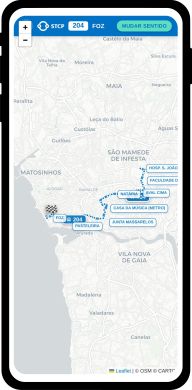
Choose the stop on the map and start tracking the bus in real time from there.
Anywhere
Or share your location
Don't know the stop code or line? Share your location via WhatsApp attachment clip to find the nearest stops.
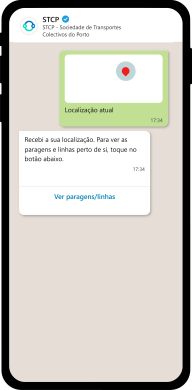
Share your location and select View stops/lines .
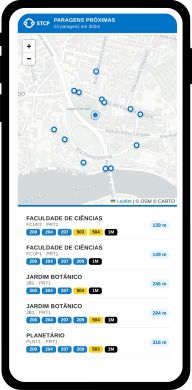
Find the nearest stop on the map , the lines available at each stop, and the walking distance to each stop.
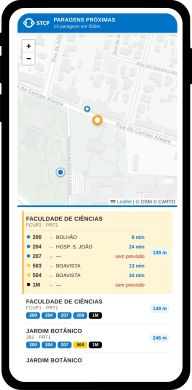
Select a stop to view destinations and wait times.
